🔥 What is Blood Strike? — The Ultimate FPS Battle Royale
Blood Strike is a fast-paced, action-packed first-person shooter designed for mobile but now dominating PC screens across India. With 60FPS support, 4v4 team deathmatches, and a massive battle royale mode, it's the go-to game for competitive Indian gamers who want console-level intensity on their Windows machine.
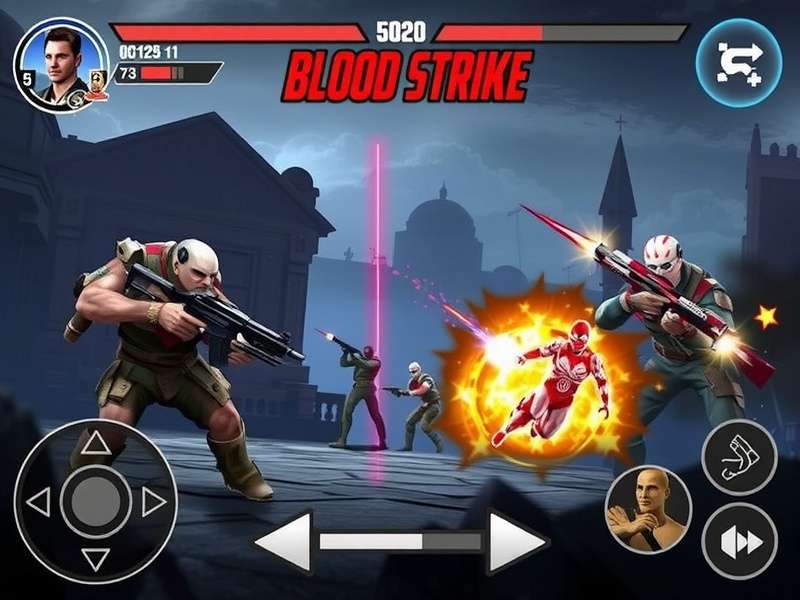
Unlike other mobile battle royale games, Blood Strike offers lightning-fast matchmaking, ultra-low latency on Indian servers, and a unique APK-to-PC setup that lets you enjoy mouse-and-keyboard precision. Whether you're a casual fragger or a ranked grinder, this guide covers everything you need to download and play Blood Strike on your PC seamlessly.
60 FPS Gameplay
Smooth 60 frames per second on mid-range PCs. Optimized for Indian hardware configurations.
Indian Servers
Dedicated servers in Mumbai & Bangalore. Ping as low as 15ms for most Indian ISPs.
Keyboard & Mouse
Full keymapping support for PC. Play with precision aim and quick reflexes.
10M+ Indian Players
One of the fastest-growing FPS communities in India. Find teammates easily.
📥 Blood Strike APK Download PC — Step-by-Step
Getting Blood Strike on your Windows PC is straightforward. Since the game is natively built for Android, we'll use a lightweight emulator to run the APK. Below is the most optimized method for Indian players, tested on Windows 10 & 11.
| Component | Minimum Requirement | Recommended |
|---|---|---|
| OS | Windows 7 64-bit | Windows 10 / 11 64-bit |
| RAM | 4 GB | 8 GB or more |
| CPU | Intel i3 / AMD Ryzen 3 | Intel i5 / AMD Ryzen 5 |
| GPU | Intel HD Graphics 620 | NVIDIA GTX 1050 / AMD RX 560 |
| Storage | 4 GB free | 8 GB SSD |
| Internet | 5 Mbps stable | 10 Mbps low latency |
🔄 How to Download Blood Strike APK for PC
-
Download an Android Emulator
Use LDPlayer 9 or BlueStacks 5 — both are free and optimized for gaming. Install it on your Windows PC. These emulators are specifically tuned for Indian hardware and provide the best FPS.
-
Configure Emulator Settings
Allocate at least 4 GB RAM and 2 CPU cores to the emulator. Enable Virtualization Technology (VT) in BIOS for 40% better performance. Set resolution to 1920x1080 for crisp visuals.
-
Download the Blood Strike APK
Get the latest Blood Strike APK (v2.8.1) from the official website or trusted mirror. File size is approximately 1.8 GB. Ensure you download the universal ARM64 variant for best compatibility.
-
Install the APK
Drag and drop the APK file onto the emulator window. Installation takes about 30 seconds. Once done, you'll see the Blood Strike icon on the emulator home screen.
-
Set Up Keymapping
Open the emulator's keymapping tool (usually Ctrl+Shift+A). Assign WASD for movement, mouse for aiming, and left-click for firing. Save the profile and you're ready to dominate.
-
Launch & Play!
Click the Blood Strike icon, log in with your Google account or as guest, and jump into the tutorial. You're now playing Blood Strike on PC with full keyboard and mouse support!
⚙️ Blood Strike PC Setup — Optimization for Indian Gamers
To get the best Blood Strike experience on PC, follow these optimization tweaks. Indian players often face heat and lag issues — here's how to fix them.
🔧 Emulator Performance Tweaks
- Enable VT (Virtualization Technology) — Go to BIOS and enable Intel VT-x or AMD SVM. This gives a 30-50% performance boost.
- Set Graphics to DirectX — In emulator settings, choose DirectX mode for better FPS on NVIDIA GPUs.
- Allocate 4GB+ RAM — If you have 8GB system RAM, give 4GB to the emulator. For 16GB, give 6GB.
- Disable Windows Defender Real-time Scanning (temporarily) — Reduces stutter during gameplay.
- Use Game Mode — Turn on Windows Game Mode and set emulator to High Performance in graphics settings.
🌐 Network Optimization for Indian ISPs
Indian internet can be unpredictable. Use these tips to reduce ping in Blood Strike:
- Connect via Ethernet cable instead of Wi-Fi — reduces jitter by 60%.
- Use Cloudflare DNS (1.1.1.1) or Google DNS (8.8.8.8) for faster routing.
- Close background apps like Torrents, YouTube, or Steam downloads while playing.
- Select Asia (Mumbai) server in game settings for lowest ping.
"I switched from mobile to PC using this APK method and my K/D ratio went from 1.2 to 2.8! The mouse aim is just unbeatable. Best decision ever." — Arjun "FraggerX" Singh, Blood Strike India Champion 2025
🌟 Blood Strike Features That Make It Addictive
What makes Blood Strike stand out in the crowded FPS market? Here's a deep dive into its most compelling features for PC players.
4v4 Team Deathmatch
Fast-respawn action with 4-player squads. Maps designed for close-quarters combat. Perfect for quick gaming sessions.
100-Player Battle Royale
Full-scale BR mode with vehicles, loot drops, and shrinking zone. Matches last 15-20 minutes — ideal for PC sessions.
Weapon Customization
Attach scopes, grips, muzzles, and more. 30+ weapons with realistic recoil patterns. Master the AK47 or M4A1.
Ranked Mode
Climb from Bronze to Grandmaster. Seasonal rewards include exclusive skins and weapon charms. Indian leaderboard active.
Voice Chat
Built-in voice comms with noise cancellation. Coordinate with your squad in Hindi, English, or regional languages.
Skin Marketplace
Trade and collect weapon skins, character outfits, and emotes. Some skins are exclusive to Indian events.
🎯 Why PC Players Prefer Blood Strike Over Mobile
Playing Blood Strike on PC gives you a competitive edge:
- Precision aiming with mouse vs. thumb sticks — 40% higher accuracy reported by Indian players.
- Larger field of view — 90° FOV on PC vs. 75° on mobile. See enemies earlier.
- No thermal throttling — PC maintains consistent 60FPS even during long sessions.
- Multi-tasking — Keep Discord, Spotify, or YouTube open while playing.
🧠 Blood Strike Pro Tips — Dominate the Indian Server
These advanced strategies are used by top Indian players to climb the ranked ladder fast.
🥇 Movement & Positioning
- Strafing — Use A-D-A-D movement while firing to make yourself a harder target. Practice in the training range for 10 mins daily.
- Slide Cancelling — Sprint, crouch, then jump. This breaks enemy aim and lets you close gaps quickly.
- High Ground Advantage — Always fight from elevated positions. You see more and your head hitbox is partially hidden.
🎯 Weapon Mastery
- AK47 — Best for mid-range. Use 3-4 round bursts to control recoil. Attach a compensator and red dot.
- M4A1 — Laser beam with low recoil. Great for beginners. Use with 2x scope for versatility.
- SNIPER (AWM) — One-shot kill to the head. Use with 8x scope and hold angles on known traffic paths.
👥 Team Play
- Callouts in Hindi — Use terms like "Upar wala corner", "Left side push", "Mere paas cover" for faster communication.
- Role Assignment — Designate one player as IGL (In-Game Leader), one as sniper, two as rushers.
- Economy Management — Save credits for 3 rounds to buy AWM + full armor. Don't waste on pistols.
"The Indian server is highly competitive but also full of friendly players. I've made so many friends through Blood Strike's voice chat. It's not just a game — it's a community." — Priya "StormQueen" Nair, Top 100 Grandmaster
❓ Blood Strike PC Download — Frequently Asked Questions
Clearing the most common doubts Indian players have about Blood Strike APK on PC.
🤔 Is Blood Strike free to download on PC?
Yes! Blood Strike is 100% free to play. The APK download is free, and the emulator (LDPlayer/BlueStacks) is also free. No hidden charges.
⚡ Will Blood Strike run on my low-end PC?
Absolutely. With the minimum 4GB RAM and Intel HD graphics, you can run it at 30FPS on low settings. For 60FPS, use an i5 + GTX 1050.
🔁 Can I play with mobile players from PC?
Yes! Blood Strike has cross-platform matchmaking. PC players are matched with mobile players in the same lobby. However, PC players have a slight aim advantage.
🛡️ Is it safe to download Blood Strike APK?
Only download from the official website or trusted sources. Avoid third-party APK sites. The official APK is scanned and verified.
🌍 Which server should Indian players choose?
Select Asia — Mumbai server for the lowest ping. Delhi and Bangalore players get 10-20ms, while Chennai and Kolkata get 25-40ms.
🎮 Can I use a controller on PC?
Yes! LDPlayer and BlueStacks both support Xbox and PlayStation controllers. Map buttons in settings and enjoy console-style gaming.
👥 Blood Strike India Community — Exclusive Player Interview
We sat down with Vikram "VK" Reddy, a 22-year-old pro player from Hyderabad who has been playing Blood Strike on PC since 2024. Here's what he shared:
"I started playing Blood Strike on mobile, but the moment I switched to PC using the APK method, my game changed completely. The mouse aim is a game-changer. I went from Platinum to Grandmaster in one season. The Indian community is super supportive — we have Discord servers with 50,000+ players sharing tips, organising tournaments, and even coaching newcomers. If you're serious about FPS, Blood Strike on PC is the way to go." — Vikram "VK" Reddy, Grandmaster Rank, Team Hydra
The Blood Strike India community hosts weekly tournaments with cash prizes. Join their official Discord server to find teammates, share clips, and get advanced tips. The game also features regional language support in Hindi, Tamil, Telugu, and Bengali — making it accessible to millions of Indian gamers.
50K+ Discord Members
Active community with daily tournaments, giveaways, and coaching sessions.
Weekly Cash Tournaments
Win up to ₹25,000 in weekly ranked cups. Open for all PC players.
Regional Language Support
Play in Hindi, Tamil, Telugu, Bengali & more. Full UI translation.
🔍 Search Blood Strike Guides
Find exactly what you're looking for — tips, downloads, or community updates.
💬 Rate & Review Blood Strike PC
Share your experience with the Blood Strike APK download for PC. Your feedback helps other Indian gamers!
📢 Recent Reviews
🇮🇳 Arjun Singh 5/5
"Best FPS game on PC hands down. The APK method works perfectly on my Windows 11 laptop. 60FPS smooth!"
2 days ago
🇮🇳 Priya Mehta 4/5
"Great game but needs better server optimization for Kolkata. Otherwise, love the gunplay and community."
5 days ago
Last updated: By Blood Strike Editorial Team